
 By
By 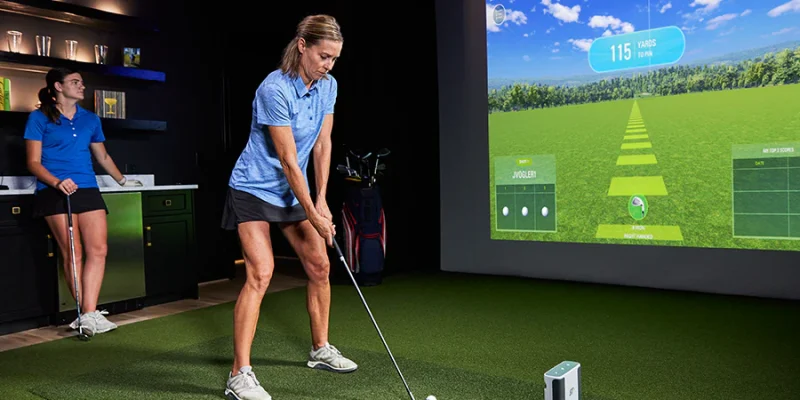
Get Better Without Leaving Home—Here’s How
Ever feel like there isn’t enough time to hit the course? Trust me, I’ve been there. That’s precisely why I decided to look into a golf sim. And let me tell you—it literally changed the game for me. This upgrade delivers big if you’re serious about your swing but short on time or space. From realistic practice to fun with the family, here’s everything I’ve learned—and why you might want to try it too.
What Is a Golf Sim and Why Does It Matter?
Okay, let’s keep it simple. A golf sim, short for simulator, is your favorite golf course packed into a screen and a few sensors. You swing like you would on the real green. The simulator tracks your shot, showing ball speed, spin, distance, and weather effects.
Why does that matter? Because practice becomes way more efficient. You get instant feedback. You know exactly what to fix. No more guessing. No more wasted buckets at the driving range.
I didn’t have time to hit the course every week and didn’t want to lose my edge. The simulator made it easy to stay sharp without the commute.
Who’s It For? Spoiler: Not Just Pros
A lot of people think these things are just for PGA-level players. Nope. I’m a weekend warrior at best—and I found it helpful. A golf sim is great for:
- Beginners who want to build muscle memory
- Busy folks who can’t get to the course often
- Parents looking for fun family time
- Serious players chasing consistent improvement
You can practice every shot—from a gentle chip to a full-on drive—without changing shoes or battling the weather.
Real Talk: Is It Accurate?
Short answer? Yes. Long answer? It’s scarily accurate. Most golf sims use high-speed cameras or radar sensors. Some track your ball with military-grade precision (not even kidding).
You get instant feedback on the following:
- Swing speed
- Ball trajectory
- Launch angle
- Carry distance
- Spin rate
These numbers help you understand why your shots go where they go. And that means faster progress. I shaved five strokes off my game in a month by tweaking my swing based on sim feedback.
Setting It Up at Home (Without Going Broke)
You don’t need a mansion. A spare room or garage will do. Most setups only need the following:
- A hitting mat
- Net or impact screen
- Launch monitor
- Computer or projector
Sure, there are high-end packages that cost more than a used car. But there are also budget-friendly options that work great for casual players.
Start simple. Upgrade later if you want. I did that, and I never felt like I missed out.
The Fun Side: It’s Not Just Practice
This isn’t just about grinding out practice shots. You can play complete courses from around the world. While eating chips, I’ve “played” Pebble Beach from my garage in socks.
You can even compete online with friends or enter local contests. Some setups come with mini-games, too—great for kids or parties. It’s part training tool and part entertainment hub.
Bottom Line: It’s Worth It
If you love golf, a simulator isn’t just a gadget. It’s an investment in your game, time, and fun. You’ll practice more often, get better results, and enjoy the game even on rainy days.
Ready to Take the Leap?
Think about how much time and money you spend driving to the course, paying green fees, and booking lessons. Imagine replacing most of that with real-time feedback, convenience, and fun—all in your home.
Whether you’re serious about dropping your handicap or want a fun way to play with friends, a golf sim delivers. It worked for me, and it could work for you too.
Don’t just wait for the perfect weather. Make every day a golf day. Get yourself a simulator and start swinging smarter, not harder.







Comments